
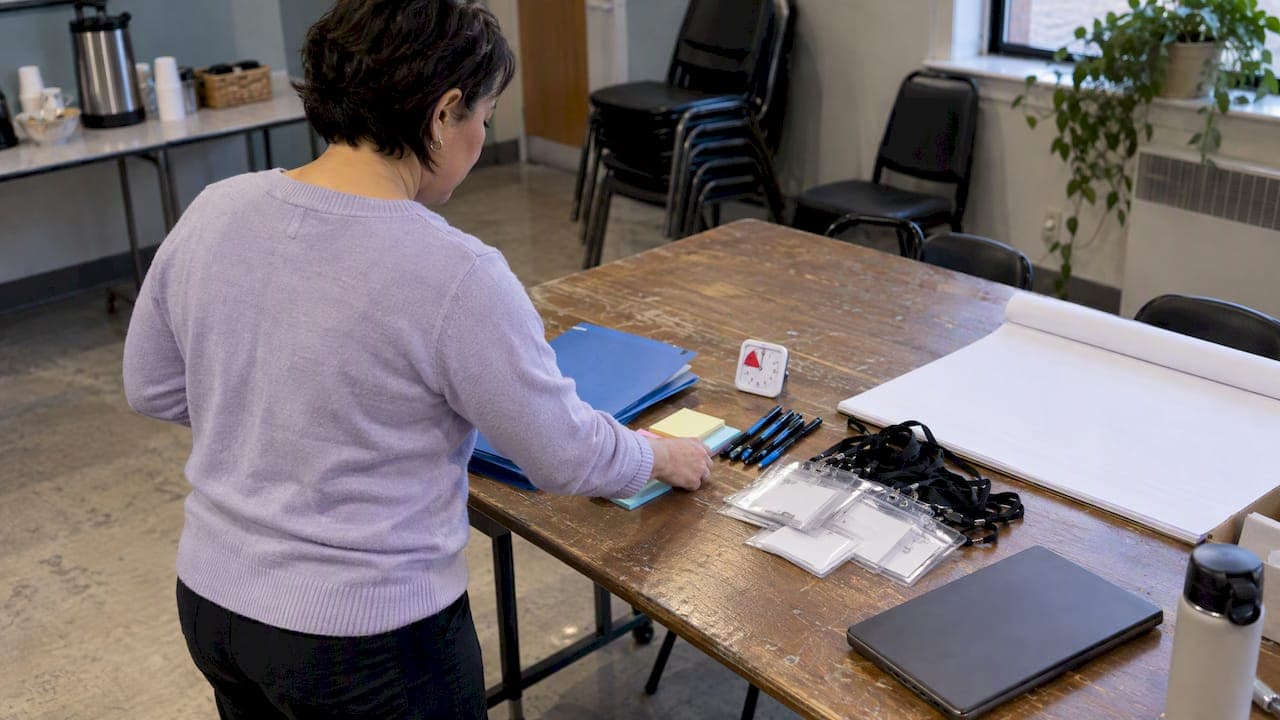
A complete DISC event packet needs five things: a one-page participant cheat sheet, individualized reports, a facilitator slide deck and script, timed activities with clear roles, and a distribution plan that covers both print and digital versions. We built this guide to help you assemble each piece efficiently, whether you are preparing for a lunch-hour team session or a full-day retreat, and we point to ready-made resources from DISC Assess along the way for organizers who need materials fast.
TL;DR:
- Prepare a complete event packet with participant cheat sheets, individualized reports, activity worksheets, facilitator scripts, and timing sheets to ensure smooth delivery.
- Use standard templates for small-team agendas and activities like report review, icebreakers, and debriefs, tailored to building self-awareness and team appreciation.
- Conduct thorough facilitator preparation, including tech checks, role assignment, pre-event communication, and clear language to support ethical, effective sessions.
- Adapt materials for virtual delivery by sharing PDFs in advance, using live slide annotation, and assigning facilitators for breakout rooms with prep checklists.
- Minimize environmental impact by prioritizing digital distribution, using recycled paper, duplex printing, and reusable supplies for in-person events.
Table of Contents
- Materials checklist: exact files to prepare, print guidance, and supply list
- Ready-to-run templates and sample activities you can launch today
- Facilitator prep checklist, common pitfalls, and ethical use guidance
- Adapting materials and activities for virtual and hybrid delivery
- Design best practices for event materials to enhance engagement and clarity
- Accessibility considerations for event materials
- Branding and customization tips for event materials
- Sustainability and eco-friendly material options for DISC events
- Tips for coordinating print and digital materials to ensure consistency
- Publisher perspective: how DISC Assess designs materials for small teams
- Quick purchase path: which DISC Assess packages supply event materials
- FAQ
- Sources
- Authoritative templates and facilitator guides to download
Materials checklist: exact files to prepare, print guidance, and supply list
Before you open a single template, it helps to know exactly what belongs in the folder. Missing a piece on event day tends to cost facilitators their momentum, so we recommend building the full set ahead of time rather than improvising at the printer.
Here is what every DISC event packet should include:
- Participant one-page cheat sheet summarizing the four DISC styles in plain, growth-oriented language.
- Individualized DISC report PDF for each participant, generated ahead of time and printed or shared digitally.
- Activity worksheets matched to your chosen exercises, with space for notes and reflections.
- A short consent and usage note at the top of the packet clarifying that results are for development conversations, not evaluation.
- Facilitator slide deck (PDF) and a written facilitator script with timing cues built in.
- Timing sheet listing each segment and its allotted minutes.
- Sign-in roster for attendance and any follow-up communication.
- Optional handouts such as role cards for group exercises and simple scoring sheets.
For print guidance, plan on one copy per participant plus five extras for walk-ins or mistakes. Use 24-pound paper at minimum for anything participants will keep, duplex print to cut weight and cost, and reserve color printing for the cheat sheet and report cover page since full-color runs add up fast for larger groups. Staple or pre-assemble packets the day before so your morning-of task list is just handing them out.
For digital distribution, export an accessible PDF (tagged headings, readable font sizes), share your slide deck through a link rather than an attachment, and consider a QR code on printed materials that links to digital copies for anyone who prefers to follow along on a device.
On the logistics side, bring a backup laptop, extension cords, name badges, sticky notes, pens, a flip chart, and a visible timer. Small gaps in supply planning are what derail an otherwise well-designed session.
Pro Tip: Pack a labeled folder for each facilitator role (lead, roving observer, tech support) so responsibilities are clear before the room fills up.
Ready-to-run templates and sample activities you can launch today
You do not need to build an agenda from scratch. Two formats cover most small-team and nonprofit needs, and both map directly to the training objectives most facilitators care about: building self-awareness, improving interpersonal skills, and helping a group appreciate its own personality diversity, which trainer surveys identify as the core goals of DISC training.
60-minute sprint agenda:
- Welcome and objectives (5 minutes)
- Brief DISC overview (10 minutes)
- Individual report review, silent reading (10 minutes)
- Icebreaker cheat-sheet exchange activity (15 minutes)
- Group debrief with scripted prompts (15 minutes)
- Takeaways and one action commitment per person (5 minutes)
Half-day agenda (3.5 hours): adds a longer practice activity, a working lunch or break, and a structured action-planning segment where each participant writes down one behavior to try in the next month.
Three sample activities fill out either agenda well:
- Icebreaker cheat-sheet exchange: participants pair up, compare their top DISC traits on the one-page cheat sheet, and guess one way their styles might clash or complement each other at work.
- Role-based communication exercise: adapted from the TeamSTEPPS tower-building task, small teams build the tallest freestanding tower from simple materials in two-minute rounds, with roles rotating between builder, communicator, and observer so everyone practices adapting their style to the task.
- Structured debrief: a facilitator-led discussion using scripted prompts such as "What did you notice about how your group handled disagreement?" to surface one concrete behavior-change commitment from each participant.
For your slide deck, eight to twelve slides typically cover the ground: a welcome slide, learning objectives, a brief plain-language explanation of DISC, time for individual report review, instructions for each activity, debrief prompts, and a closing takeaways slide. Pair the deck with a downloadable one-page cheat sheet participants can keep at their desks.
University-run team-building programs rely on this same structure: short, stage-based exercises with printable templates and built-in debrief prompts that speed up facilitator preparation without sacrificing depth.
Facilitator prep checklist, common pitfalls, and ethical use guidance
Good materials only go so far without a facilitator who knows how to run the room. A short prep routine before the event, paired with a few in-the-moment adjustments, prevents most of the problems that derail DISC sessions.
Before the event:
- Run a full tech test of your slide deck, any shared links, and audio or video equipment.
- Assign roles ahead of time: a lead facilitator, a roving observer for small-group work, and someone to monitor tech issues.
- Build timeboxing cues into your script, including a visible signal for "two minutes remaining."
- Send pre-reading or the participant cheat sheet a day or two in advance so people arrive oriented.
During the event, language matters more than most facilitators expect. Describe DISC results as tendencies that can shift with context and effort, never as fixed labels. For quieter participants, a roving observer who checks in with a direct, low-pressure question works better than calling on someone in front of the full group. For participants who dominate discussion, redirect with a specific ask to another person rather than a general "let's hear from others."
After the event, send a short follow-up email summarizing key takeaways, attach a brief evaluation form, and suggest one next step for managers: a short one-on-one conversation about how the team might apply what came up.
On ethical use, keep one rule visible throughout: DISC results support development conversations and team discussion, never hiring decisions or performance penalties. A single consent line printed at the top of each packet, stating plainly that results are for development only, protects both participants and facilitators from pressure to misuse the data.
Pro Tip: Give your roving observer a five-point checklist: tech check, attention cue, one probing question, time update, and a line for debrief notes.
Adapting materials and activities for virtual and hybrid delivery
Moving a DISC session online does not mean rebuilding it. Send PDFs in advance with a note on whether participants should print or view on screen, and plan to share your slides live with screen annotation turned on so you can mark up the cheat sheet together in real time.
For breakout rooms, assign a facilitator for each one and give that person a ten-minute prep checklist: confirm camera angle, gather any printed props, and set a visible timer. TeamSTEPPS exercises translate well into breakout formats because their short, timed rounds and clear roles keep remote groups engaged even without in-person energy. Keep a minimal-technology fallback ready, such as a phone call option, for anyone whose connection drops.
A few adjustments matter for accessibility: build in closed captions where your platform supports them, use larger fonts on shared slides, and distribute materials in accessible file formats from the start rather than retrofitting them later.
- Share PDFs ahead of time with clear print-or-view instructions.
- Assign a breakout facilitator with a ten-minute prep routine per room.
- Offer a low-tech fallback and accessible file formats for remote participants.
Design best practices for event materials to enhance engagement and clarity
Materials that are easy to scan get used; dense ones get set aside. Keep your cheat sheet to one page with generous white space, a simple four-quadrant layout for the DISC styles, and no more than two colors beyond black text. Readers absorb a visual summary faster than a paragraph, so favor short labeled sections over blocks of explanation.

For slide decks, limit each slide to one idea and a handful of words. A slide that says "Dominance: direct, results-focused, decisive" communicates faster than a slide with three sentences of description. Use consistent heading styles across every document in the packet so a participant flipping between the cheat sheet, worksheet, and slides recognizes the structure immediately.
Font size matters more than it seems: 11-point body text reads fine on a desk but disappears on a projected slide. Set slide body text at 24-point minimum and headlines larger still. For printed worksheets, leave room to write. A worksheet crammed edge-to-edge with text discourages the reflection it is meant to prompt.
Finally, sequence your materials to match the agenda. If the cheat sheet comes before the activity instructions in the packet, participants reference it naturally instead of flipping back and forth mid-exercise.
Accessibility considerations for event materials
Accessible materials are not an add-on, they are part of getting the session to work for everyone in the room. Start with your digital files: export PDFs with tagged headings and proper reading order so screen readers can navigate them, and avoid scanned images of text that assistive technology cannot parse.
For print materials, choose a sans-serif font at 12-point or larger for body text, and increase that to 14-point or more for any handout aimed at a mixed-age group. High-contrast color choices (dark text on a light background) help participants with low vision far more than a branded color palette with a close value match.
For virtual sessions, turn on closed captions by default rather than waiting for a request, and describe any visual content out loud as you present it, since not every participant can see a shared screen clearly. If your venue or platform allows it, offer an audio-only dial-in option for anyone with bandwidth constraints.
A simple practice that costs nothing: ask in your pre-event communication whether anyone needs a specific accommodation, and build in the time to address it before the session starts rather than improvising in the room.
Branding and customization tips for event materials
Adding your organization's identity to a DISC packet builds familiarity without overwhelming the content. Place your logo in a consistent corner of each document, pick one or two brand colors for headers, and leave the body text in simple black for readability.
Customization works best when it serves the group, not just the look of the page. A nonprofit might add a line connecting DISC styles to volunteer coordination roles, while a small business might reference specific team projects in its debrief prompts. We cover this kind of tailoring in more depth in our guidance for nonprofits using DISC with volunteer teams.
Keep your organization's name off the individualized report pages themselves. These are personal documents, and adding branding there can make them feel more like a company record than a personal growth tool, which runs against the development-only framing you want participants to trust.
If you facilitate for multiple departments or client groups, build one master template with your branding locked in, then swap only the activity-specific worksheets between sessions. This keeps your visual identity consistent while saving redesign time for every new group.

Sustainability and eco-friendly material options for DISC events
Cutting back on print volume is the single biggest lever for a lower-waste event. Default to digital distribution for anything participants do not need to physically hold, and reserve printing for the cheat sheet and individual reports, which people tend to keep and reference later.
When you do print, recycled paper stock and soy-based or vegetable-based inks are now widely available through most office supply and print shops, and they typically cost close to standard options. Duplex printing cuts paper use roughly in half for multi-page packets, and skipping full-color runs in favor of black ink for worksheets and scripts reduces both cost and environmental footprint.
For supplies beyond paper, consider reusable items over single-use ones: dry-erase role cards instead of printed-and-discarded ones, a shared set of markers rather than individual throwaway pens, and name badges with reusable holders. If your group meets regularly, a small investment in durable materials pays off across multiple sessions.
Digital-first delivery also supports accessibility goals at the same time, since screen-readable files serve both purposes without extra work.
Tips for coordinating print and digital materials to ensure consistency
Nothing undermines a session faster than a facilitator referencing "slide 7" while half the room is looking at a printed packet with different page numbers. Build both formats from one master document whenever possible, then export to print and digital versions rather than maintaining two separate files that drift apart over time.
Use identical section titles and ordering across every format: the cheat sheet, the slide deck, and the worksheets should all refer to the DISC styles in the same order and with the same labels. If you update a timing or a prompt in one version, update it in all three before the event, not during.
A simple version-naming system helps here, something as plain as a date in the filename, so you always know which copy is current. Before printing, do a side-by-side check against the digital version projected on screen to confirm page breaks, numbering, and any QR codes still point to the right files.
Publisher perspective: how DISC Assess designs materials for small teams
We build our DISC tools around one constraint: small teams and nonprofits rarely have a dedicated HR department to manage materials, so we keep our assessment platform, group management features, and detailed reports simple enough to deploy without specialized training. Several of our packages bundle downloadable facilitator guides and slide decks directly with the assessment purchase, and group admin tools let one coordinator manage reports and materials for an entire team or cohort. Facilitator memberships extend access across multiple events throughout the year.
— Tres
Quick purchase path: which DISC Assess packages supply event materials
Once your agenda is ready, the fastest way to get your packet filled is to pull from a package built for the job. Our Add Offline Assessments option supplies printable assessment bundles for groups running in-person sessions without individual logins. Our Camps & Retreats Package is built for multi-day events, bundling broader access for larger groups meeting over an extended schedule. Our Pro Group Package adds facilitator-level tools for organizations running repeat sessions across multiple teams.

- Add Offline Assessments: printable bundles for in-person groups.
- Camps & Retreats Package: broader access suited to multi-day events.
- Pro Group Package: facilitator tools for recurring group sessions.
For individual assessments, group admin accounts, or membership options, our full catalog outlines what fits your team size. You can also browse our individual and group plans directly, or preview our Extended Pro Membership if you facilitate events regularly throughout the year.
FAQ
What should be included in a basic DISC event packet?
A basic packet includes a one-page participant cheat sheet, an individualized DISC report, activity worksheets, a facilitator script and slide deck, and a timing sheet. Adding a brief consent note clarifying development-only use rounds out a packet that covers most small-team sessions.
How many printed copies should I bring to a DISC workshop?
Plan for one copy per confirmed participant plus about five extras for walk-ins or printing errors. Digital backups on a shared link or QR code cover anyone who prefers to follow along on a device instead.
How do I adapt DISC activities for a virtual team?
Send PDFs in advance with print-or-view instructions, share your slide deck live with annotation enabled, and assign a dedicated facilitator to each breakout room with a short prep checklist. Structured, timed activities like the TeamSTEPPS tower exercise translate well to breakout rooms because the roles and timing stay clear on camera.
Can DISC results be used for hiring decisions?
No. DISC profiles are intended for development conversations and team discussion, and using them for hiring or performance decisions goes against their intended purpose. A simple consent line on participant materials, stating that results are for development only, helps keep this boundary clear for everyone involved.
What DISC Assess package is best for a one-day team retreat?
Our Camps & Retreats Package is built for multi-day or retreat-style events needing broader access across a group, while our Add Offline Assessments option suits a single in-person session without individual logins. Pricing and feature details for both are available on our store pages.
Sources
- Use DiSC to Understand Team Dynamics | Iowa State University Extension and Outreach Professional Development
- TeamSTEPPS Building Block Exercise Instructions
- Team Building Toolkit (UC Berkeley)
- A New Way to Address Troubled Team Dynamics | MIT Sloan Management Review
Authoritative templates and facilitator guides to download
- Use DiSC to Understand Team Dynamics | Iowa State University Extension and Outreach Professional Development
- TeamSTEPPS Building Block Exercise Instructions
- Team Building Toolkit (UC Berkeley)
- A New Way to Address Troubled Team Dynamics | MIT Sloan Management Review